# Collateral

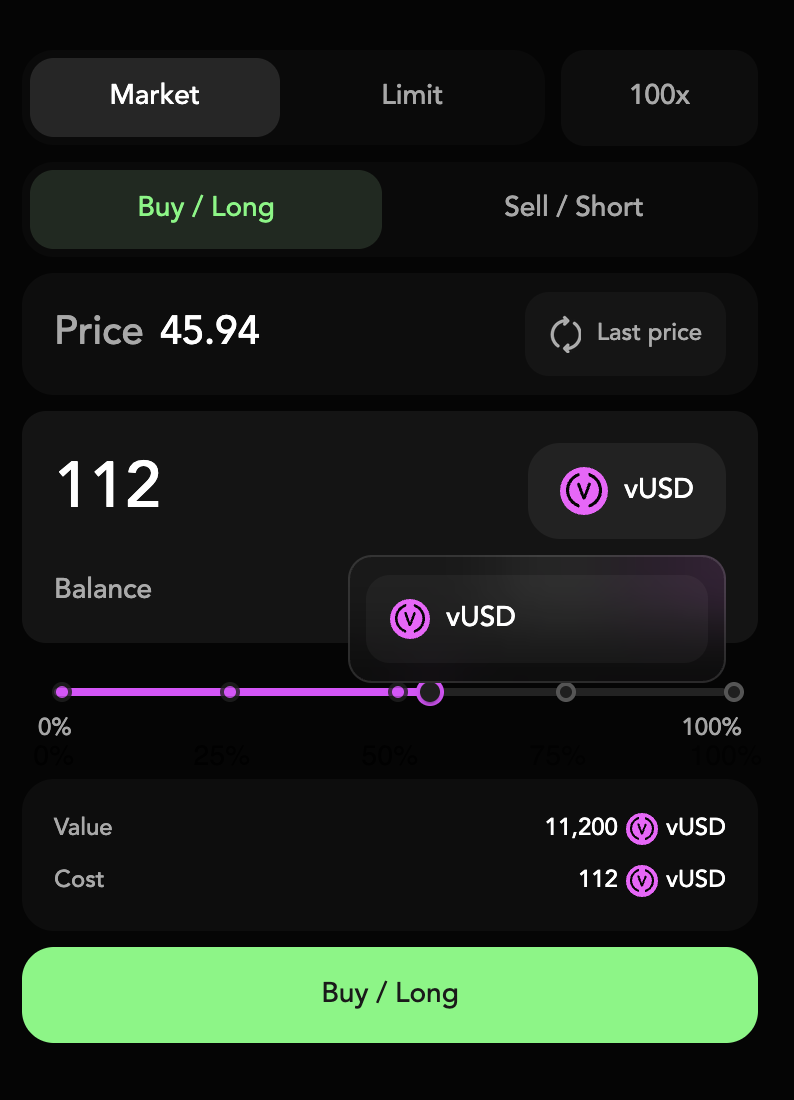
## Collateral Select

* **Collateral dropdown** (e.g. vUSD): Select which token you post as margin.
* **Balance**: Your free collateral of that token.
* Changing collateral recalculates slider limits, Value, and Cost in real time.
<div align="left"><figure><img src="/files/XNRhqIX0ZV1ttNkzRAJQ" alt="" width="375"><figcaption></figcaption></figure></div>

***

## Amount Slider

The **Amount Slider** is your quick way to size up orders in logical chunks, without manual math.

* **Draggable handle** on a 0–100% bar: Chooses what fraction of your collateral to use.
* **Preset dots** at 25%, 50%, 75%: One‑tap selection of common sizes.
* **Tooltip (“56”)**: Shows the exact percentage as you drag.
* **Value & Cost** fields update live: See notional position size and margin requirement.

<div align="left"><figure><img src="/files/MT1iRN3rpOr8XQW1vxLx" alt="" width="350"><figcaption></figcaption></figure></div>


---

# Agent Instructions: Querying This Documentation

If you need additional information that is not directly available in this page, you can query the documentation dynamically by asking a question.

Perform an HTTP GET request on the current page URL with the `ask` query parameter:

```
GET https://docs.nunchi.trade/nunchi-testnet-user-guide/trading-interface/collateral.md?ask=<question>
```

The question should be specific, self-contained, and written in natural language.
The response will contain a direct answer to the question and relevant excerpts and sources from the documentation.

Use this mechanism when the answer is not explicitly present in the current page, you need clarification or additional context, or you want to retrieve related documentation sections.
